Last updated: July 6, 2026
- Accessibility in digital marketing means building your marketing content so people with disabilities can perceive, understand, and act on it, on your website and across every social channel.
- More than 1 in 4 U.S. adults live with a disability, so inaccessible marketing quietly cuts off a large share of your potential audience.
- The single most powerful habit is giving every image, video, and audio asset a text foundation: descriptive alt text, captions, and transcripts.
- Social platforms vary widely: YouTube and Facebook offer strong caption tools, while Instagram, Twitter/X, LinkedIn, and Pinterest each have real gaps. Use the comparison table below to see where to focus.
- Accessibility is not an afterthought. Bake it into your content workflow from the first draft, and treat your website as the accessible home base everything else points back to.
What does accessibility in digital marketing actually mean?
Accessibility in digital marketing means creating marketing content that people with disabilities can fully perceive, understand, and act on, whether that content lives on your website, in an email, or on a social feed. In practice it comes down to giving non-text content, such as images, video, and audio, a text equivalent that assistive technologies like screen readers can read aloud or convert to braille. Get that right and your marketing reaches everyone; skip it and you exclude a large, often overlooked audience.
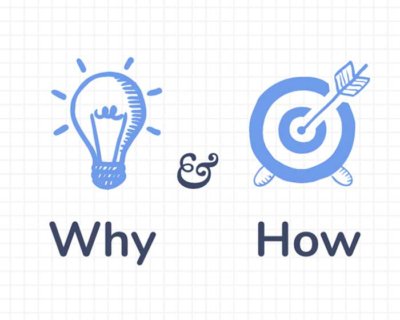
The stakes are bigger than most teams assume. According to the CDC, more than 1 in 4 U.S. adults have some type of disability. That is not an edge case to handle later; it is a meaningful slice of the customers, donors, and prospects you are already paying to reach. Far too much marketing content and design work still ships without accessible features, putting it out of reach for tens of millions of people. This guide covers two things: the why behind accessible marketing, and the how, with concrete steps for the platforms you use every day.
Why does accessibility in digital marketing matter?
Accessibility matters because every person who cannot use your content is a person you cannot inform, persuade, or convert. Beyond the clear ethical case, accessible content reaches a wider audience, performs better in search, and reduces legal exposure. To act on it, it helps to understand the abilities and barriers involved and why text sits at the center of every accessible asset.
Abilities and barriers
The Web Content Accessibility Guidelines (WCAG) describe a range of abilities and barriers, including visual, auditory, cognitive, physical, and speech. This guide focuses on the two that most directly shape marketing content:
- Visual abilities range from mild or moderate vision loss in one or both eyes (“low vision”) to substantial, uncorrectable loss in both eyes (“blindness”).
- Auditory abilities range from mild or moderate hearing loss (“hard of hearing”) to substantial, uncorrectable loss in both ears (“deafness”).
A visitor with low vision may rely on a screen reader to interpret your images, while a Deaf visitor needs captions to follow your video. Both depend on the text you provide.
Why text is the foundation of accessible content
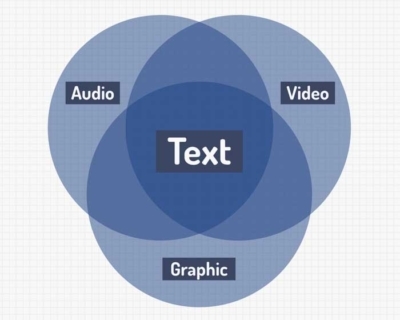
Images, video, and text are the three formats that make up the major marketing channels, from Facebook and YouTube to Instagram, LinkedIn, Twitter/X, and Pinterest. Format matters, because every one of those formats should rest on a text foundation.
Text is the connective tissue between formats. Users and assistive technologies can translate text into almost any other format, including synthesized speech, braille, or large-print visuals. Audio and video cannot be translated as freely. That is why descriptive alt text, captions, and transcripts are not extras; they are what make your content adaptable and accessible. This is exactly the thinking we apply to website accessibility, and it carries directly into your marketing.
For a deeper look at this, see CCPA Exemptions: Which Businesses and Data Are Exempt?
We see this play out in client work, not just in theory. In our work with NeighborHealth, Massachusetts’ largest community-focused health center, accessibility could not be a finishing touch: the site had to serve a diverse, multilingual community. 3 Media Web consolidated four separate domains into one accessible WordPress platform and developed a VPAT (Voluntary Product Accessibility Template) as part of the build, and the unified site saw a 35% increase in organic search traffic within three months of launch. Accessible foundations and marketing performance are not in tension; they reinforce each other.
How accessible are the major social platforms?
Social platforms differ a lot in how much accessibility they support, so it pays to know where each one helps and where it leaves gaps. The table below compares six major networks across image alt text and video captions, the two features that matter most for marketing. Use it to decide where your team can add accessibility easily and where you will need a workaround.
| Platform | Image alt text | Video captions / subtitles | What to watch for |
|---|---|---|---|
| YouTube | Uses the video title; no custom thumbnail alt text. | Strong: upload an SRT file, transcribe manually, or use auto-captions. | Auto-captions are a starting point, not a finish line. Always review and edit them. |
| Yes, on desktop (AI-generated alt text you can edit); not in the iOS app. | Yes: auto or manual transcription, plus custom SRT upload. | Alt text editing is desktop-only, so plan a mobile-to-desktop handoff for event posts. | |
| Yes: “Write Alt Text” under Advanced Settings (about 100 characters). | No official subtitle tool; captions must be burned into the video before posting. | Despite shared ownership with Facebook, the SRT workflow does not carry over. | |
| Twitter / X | Yes: add a description on desktop (“Edit” then “Alt”) or mobile (“Add description”). | Limited and difficult for most users; historically gated behind special tools or the API. | Image alt text is the reliable win here; treat video captions as a manual effort. |
| Yes: “Add alt text” when sharing an image (up to about 120 characters). | Partial: you can upload your own SRT file, but cannot type captions in-platform. | Prepare the SRT in advance, because there is no manual caption editor. | |
| No consumer control; alt text is pulled from the source page title. | No caption or subtitle support for video. | Optimize the source page title, since that is the only lever you have. |
This gap between platforms is not just an inconvenience. According to WebAIM’s 2024 Screen Reader User Survey (#10), the most widely reported barriers screen reader users encounter still include images with missing or improper alt text. Wherever a platform gives you an alt text or caption field, fill it in well, because real people are relying on it.
A closer look at captions: verbatim or not?
When you do add captions, you face a small editorial choice: transcribe word for word, or clean it up. According to 3Play Media, whose guidance on captioning and subtitling standards draws a useful line:
For broadcast/scripted media, transcribe content as close to verbatim as possible… include every “um,” every stutter, and every stammer because they are intentionally included. There is more leeway for unscripted reality shows, documentaries, and news broadcasts, because the filler words are usually unintentional and irrelevant.
For most marketing video, the default answer is no, do not transcribe verbatim. That gives you room to write clean, sculpted captions that read well and reinforce your message:
- Scripted dialog: caption it verbatim.
- Unscripted or live: tighten and clarify, dropping the filler.
What is a VPAT, and do you need one?
A VPAT (Voluntary Product Accessibility Template) is a standardized document that reports how well a website, app, or digital product conforms to accessibility standards such as WCAG and Section 508. Buyers, especially government agencies, universities, and large enterprises, often request one during procurement. If you sell to those audiences, or your marketing site is central to a mission of equitable access, a VPAT signals that accessibility is documented, not assumed.
When should you audit your marketing for accessibility?
Audit at three moments: before a major campaign or site launch, on a recurring schedule (a quarterly pass on live pages and social templates works well), and immediately after any redesign or platform migration. The earlier you check, the cheaper the fix, because catching a missing caption or low-contrast graphic in the first draft is far easier than retrofitting it once the asset is published and shared.
Where should you add accessibility text?
Just about everywhere you publish. Your website comes first as the accessible home base every campaign points back to, but the same habit applies across YouTube, Facebook, Instagram, Twitter/X, LinkedIn, Pinterest, and beyond, including Vimeo, SoundCloud, Medium, and your podcast feed. Tools like Google Slides also build in alt text and other assistive features, so use them when you create supporting decks and graphics.
For related strategies, check out Google & Yahoo Bulk Email Sender Requirements: How to Comply.
The mindset that ties it all together is simple: access is not an afterthought. The teams that do this well stop treating accessibility as a final checklist item and start building it into the first draft of every asset. If you are weighing whether to handle that in-house or bring in help, it is worth understanding what to expect from a website support partner before you decide. And because accessibility is foundational to how a site is built, it belongs inside your broader website build practice, not bolted on afterward.
Frequently asked questions
What is accessibility in digital marketing?
Accessibility in digital marketing is the practice of creating marketing content that people with disabilities can perceive, understand, and act on. It means giving images, video, and audio a text equivalent, such as alt text, captions, and transcripts, so assistive technologies like screen readers can convey them. The goal is for every visitor, regardless of ability, to get the same information from your website, emails, and social posts.
Why is accessible marketing content important?
It is important because more than 1 in 4 U.S. adults have a disability, so inaccessible content excludes a large share of your audience. Accessible marketing also tends to perform better in search, reaches more people, and lowers legal risk. Most importantly, it is the right thing to do: it ensures customers, donors, and prospects with disabilities can engage with your brand on equal footing.
What is alt text and why does it matter?
Alt text is a short written description of an image that screen readers read aloud and that displays when an image fails to load. It matters because images without proper alt text are one of the most problematic barriers screen reader users report. Good alt text describes the meaning or function of the image in plain language, so a visitor who cannot see it still understands what it conveys.
Which social platforms have the best accessibility features?
YouTube and Facebook offer the strongest caption support, including SRT upload and manual transcription. Instagram, Twitter/X, and LinkedIn all support image alt text but have notable gaps in video captioning, and Pinterest offers the least consumer control. The comparison table above breaks down image alt text and video captions for six major platforms so you can prioritize your effort.
Should video captions be transcribed word for word?
Not always. For scripted dialog, transcribe verbatim, because the exact wording is intentional. For unscripted or live content, you have leeway to tighten the text and remove filler words like “um.” For most marketing video, that means writing clean, edited captions that stay accurate while reading clearly, rather than a strict word-for-word transcript.
Is digital accessibility a legal requirement?
In many cases, yes. U.S. courts have increasingly treated websites as places of public accommodation under the Americans with Disabilities Act (ADA), and organizations that receive federal funding or sell to the government face Section 508 obligations. WCAG is the standard most often referenced. Even where the law is ambiguous, accessible marketing lowers legal risk and widens your reach, so it is worth doing regardless.
How 3 Media Web Can Help
Accessible marketing starts with an accessible website, and that is where we focus. At 3 Media Web, we design and build sites with accessibility baked into the process rather than added at the end, guided by our Human and AI approach so expert judgment leads and technology supports it. That includes:
- Website accessibility and ADA-minded design so every visitor can use your site.
- A foundation of clean, well-structured content that gives your images, video, and audio the text equivalents assistive technology needs.
- A complete website build practice that treats accessibility as core infrastructure, not a finishing touch.
Making your digital marketing accessible is a journey, and it is one your business and your audience will both benefit from. Contact 3 Media Web to talk through an accessible, inclusive website built to reach everyone.